
Getting started
Intelligent Merchant Monitoring is a merchant website content monitoring service for acquiring banks and PSPs. On a schedule, it crawls the public websites of connected merchants, detects goods and services prohibited by card scheme rules, and collects an evidence base for compliance review.
This guide describes the admin panel from the bank’s perspective: alert review, site management, applicability of shared stop lists, merchant underwriting (Underwriting) and onboarding. All examples use demo data of a fictional tenant, “ArtCloud LLC”. Interface screenshots are shown in Russian; the panel is fully available in English — switch the language with the flag in the top bar.
Signing in
Section titled “Signing in”The panel is available at https://admin.shield.by. Sign in with email and password.
Accounts are created by your organisation’s administrator (or the platform provider): a new user receives an invitation email with a link to set their password. The link is valid for 72 hours; if it expires, the administrator can resend the invitation.
In the user profile you can enable two-factor authentication: at sign-in the system additionally asks for a one-time code sent by email.
User roles
Section titled “User roles”| Role | What they can do |
|---|---|
| Administrator | Full access within the organisation: users, sites, merchants, cases, notification settings. Shared stop lists — view and disable unneeded ones only (no editing). Platform-level settings are not available. |
| Compliance officer | Day-to-day work: alert review and case underwriting. Can create sites, merchants, cases and applications, but does not manage users or reference data. |
| Auditor (read-only) | Sees sites, alerts, merchants, cases and the activity log; changes nothing. |
Organisations are isolated: bank users only see their own sites, alerts and cases.
Modules and navigation
Section titled “Modules and navigation”Below the top bar there is a module switcher: Monitoring, Underwriting, Onboarding or “All modules”. Selecting a module hides the other sections in the sidebar — convenient if you work within a single workflow.
- Monitoring — sites, alerts, statistics: oversight of the live portfolio.
- Underwriting — merchants and cases: merchant verification and risk scoring.
- Onboarding — applications from new merchants.
Dashboard
Section titled “Dashboard”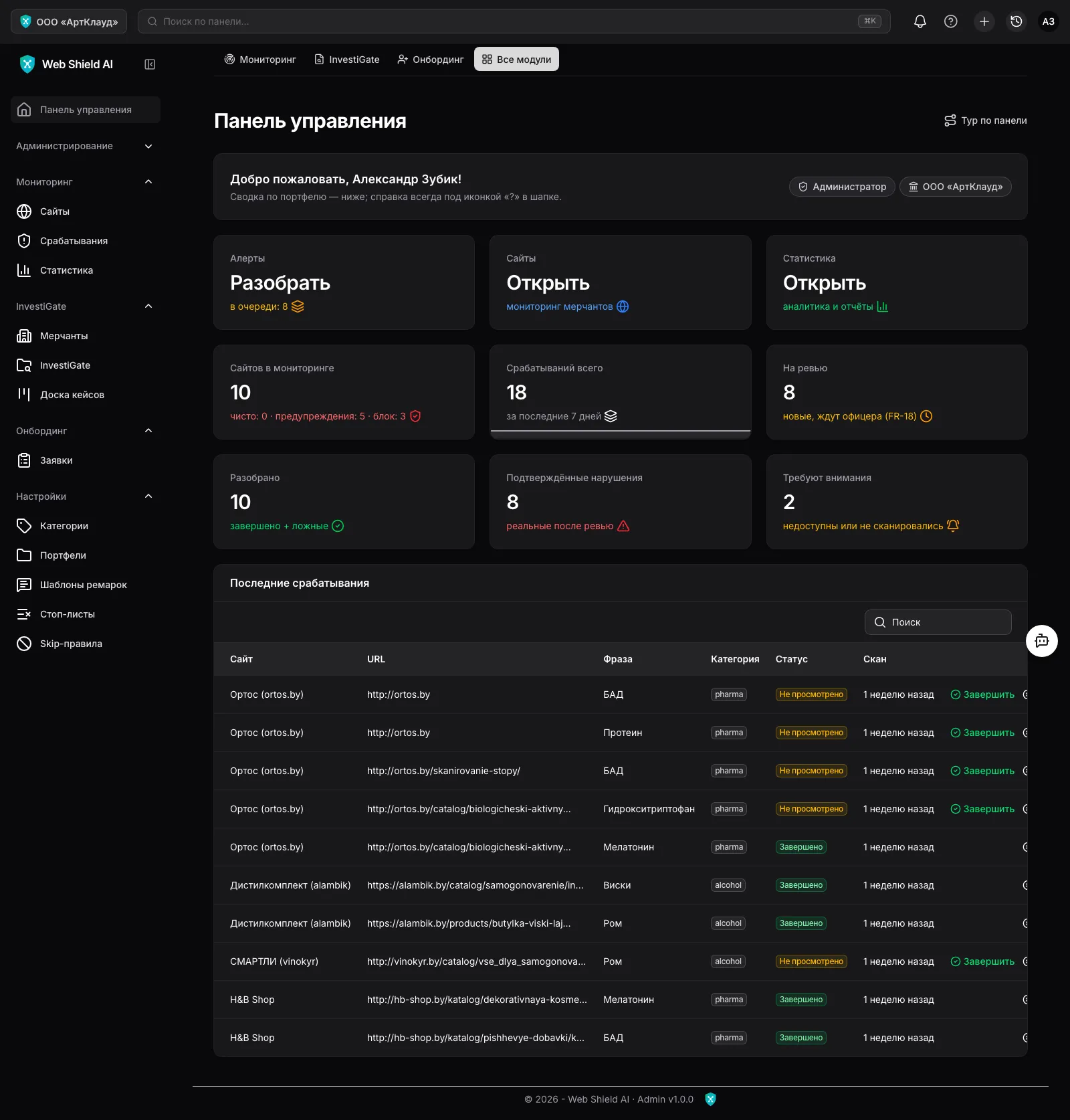
The start page shows an operational summary: alerts pending review, sites under monitoring, new alerts for the week, average portfolio risk level, confirmed violations and items that need attention. Below is a table of the latest alerts with one-click access to review.
Where to go next
Section titled “Where to go next”- Sites & monitoring — connecting merchant sites and crawl frequency.
- Alert review — the compliance officer’s daily workflow.
- Stop lists & categories — what exactly the system searches for.
- Underwriting — cases, risk scoring and PDF reports.
- Merchant onboarding — receiving applications from new merchants.
- Settings & users — notifications, team, activity log.
- FAQ & troubleshooting — false positives, SPA sites, invitations.